A business cannot get a GSTIN without a verifiable address for its Principal Place of Business (PPOB). Renting a full office in Bangalore just to satisfy this one requirement costs lakhs in deposit and fit-out before a single invoice is raised. A virtual office solves this by giving a business a real, inspectable commercial address in Bangalore along with the exact documents the GST portal asks for: a rent or service agreement, a No Objection Certificate (NOC), and a utility bill.
This guide covers what a virtual office actually is for GST purposes, the full document checklist, the step-by-step registration process on the GST portal, current Bangalore pricing, and the common rejection triggers to avoid.
Yes. A virtual office is a legally accepted address for GST registration in India, provided the provider furnishes a valid rent or service agreement, an NOC, and a utility bill for the premises. GST law does not require a business to physically occupy every square foot of its registered address at all times; it requires the address to be genuine, verifiable, and backed by consent documentation from whoever controls the premises.
Under GST Circular 161/17/2021 issued by the CBIC, shared and consent-based premises, including virtual office arrangements, are accepted as a valid Principal Place of Business as long as supporting documents are in order. GST officers have since formalised how these documents are reviewed under CBIC Instruction No. 03/2025-GST, which sets out the current framework for verifying NOCs and address proof for consent-based premises, including virtual offices.
A virtual office is not a separate legal category under GST. It falls under the same “consent premises” bucket as a shared office, an employer’s premises used by a freelancer, or a relative’s home used for business. The virtual office provider simply plays the role of the property owner or authorised party in that arrangement.
A virtual office provider should hand over three documents before a business applies on the GST portal:
On the applicant’s side, the following are also needed:
A registered rent agreement, if the provider holds one, generally removes the need for a separate NOC. Without a registered agreement, the NOC along with the provider’s identity and one ownership document of the premises is the accepted substitute. It is worth confirming with the provider upfront which route they follow, since GST officers use this to cross-check the application.
One operational detail that causes avoidable rejections: most GST portals cap document uploads at 100 KB per file in PDF or JPEG format. Scanned files from a phone camera routinely exceed this, so ask the provider for pre-compressed copies rather than compressing them yourself at the last step.
A business already registered in another state, or already registered in Bangalore under one address, can add a Bangalore virtual office as an Additional Place of Business (APOB) rather than filing a fresh registration. This is common for companies expanding into Bangalore for sales, warehousing, or a second business line without shifting their primary registration.
The document requirement for an APOB addition is identical to a fresh PPOB registration: a valid rent or service agreement in the business’s name, a signed NOC from the property owner or provider, and a utility bill for the premises. The application is filed as a non-core amendment on the GST portal under the existing GSTIN, and approval timelines generally track the same 3–7 working day window as new registrations.
Businesses selling goods or services across multiple states, running e-commerce operations, or storing inventory in more than one location need a separate state-wise GST registration for each place of business. A virtual office in each relevant state or city satisfies this requirement without the cost of a physical branch in every location.
Physical verification of the premises can happen in some jurisdictions, particularly for first-time registrations. A provider that operates a genuine, staffed location with signage handles this smoothly; a provider offering only a mailbox address is where physical verification most often causes a rejection.
Pricing in Bangalore varies by locality, plan inclusions, and how quickly documents are delivered. As a general market range across established providers in 2026:
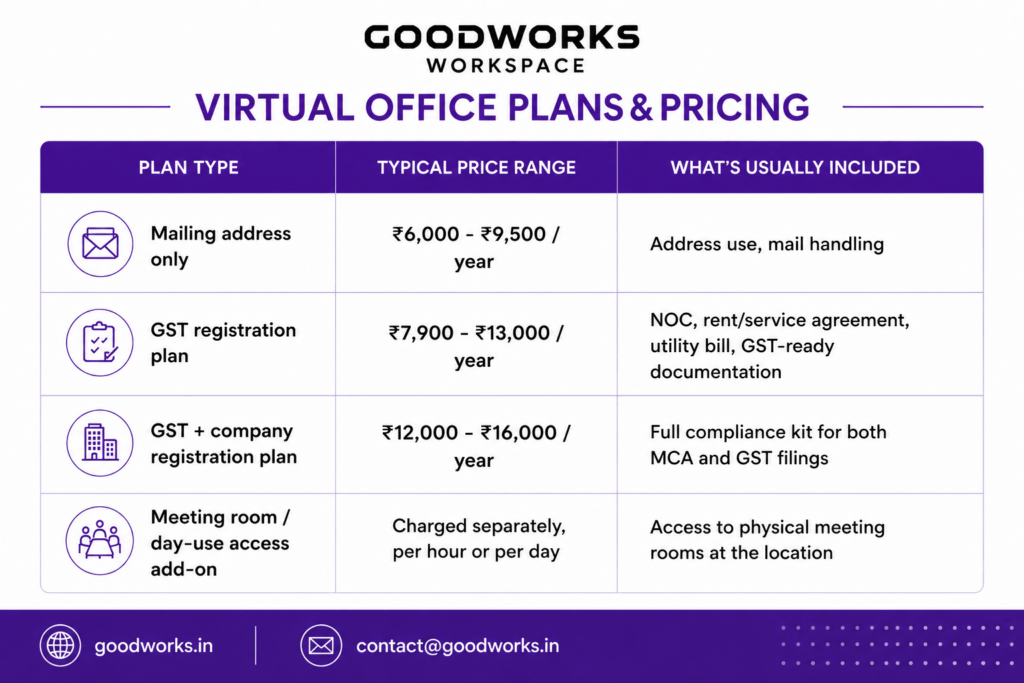
Compare this against a Grade-A managed office in a Bangalore business district such as Whitefield, Koramangala, or ORR Bellandur, which typically requires a refundable deposit in the ₹2.5–6 lakh range plus fit-out costs before a business even opens its doors. For a business whose only near-term requirement is a compliant registered address, the virtual office route removes that upfront capital need entirely while keeping the door open to move into a physical coworking seat or managed office at the same location later.
Working with a provider that has an established, staffed centre with meeting rooms and signage, rather than a purely digital mailbox service, materially reduces the risk on the last two points.
Most of the rejection triggers covered above trace back to one root cause: the provider behind the address is a mailbox service, not a real workspace operator. GoodWorks removes that risk at the source because the virtual office address is not a standalone product bolted onto a shell company. It is an address inside an actual, staffed GoodWorks centre.
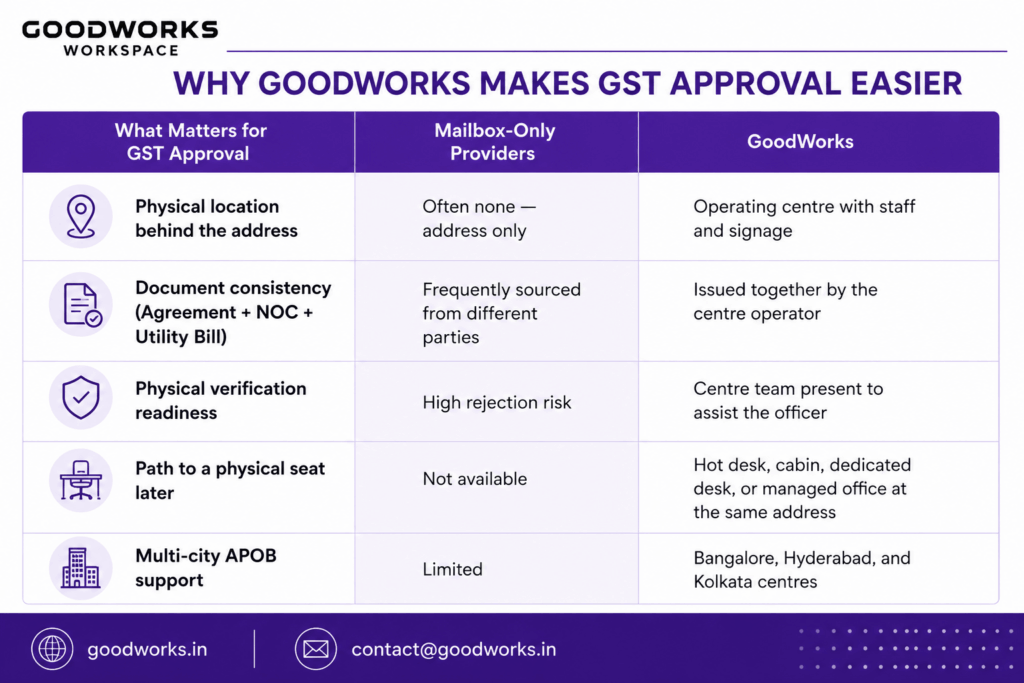
A virtual office in Bangalore should give you more than a document set. It should give you a real, staffed Bangalore address that can withstand a physical verification visit, plus a clear path to scale into a dedicated desk, private cabin, or managed office at the same location as your team grows. That is what a GoodWorks virtual office is built to do.